Most developers adopting VS Code's Agent mode watch in horror as their AI assistant burns through API credits, recursively modifying the wrong files in an endless loop. They think the model is too dumb, but the real bottleneck is not the model—it is your lack of runtime guardrails.
The Illusion of Unconstrained Agentic Autonomy
When you toggle on VS Code's experimental Agent mode, you are handing a blind agent a loaded keyboard. The promise is enticing: 'Just describe the feature, and the agent will implement it across nine different files.' But without constraints, agents operate on static context. They lack the real-time execution awareness of a human developer. The agent enters a loop: it makes a destructive change, encounters a compilation error, attempts to patch it with another hallucinated fix, and repeating this cycle until your token budget is depleted. The root cause of this failure is not a lack of reasoning in LLMs; it is the absence of an execution boundary between tool invocation and state mutation.
The Core Philosophy of the Hook-Mediated Architecture
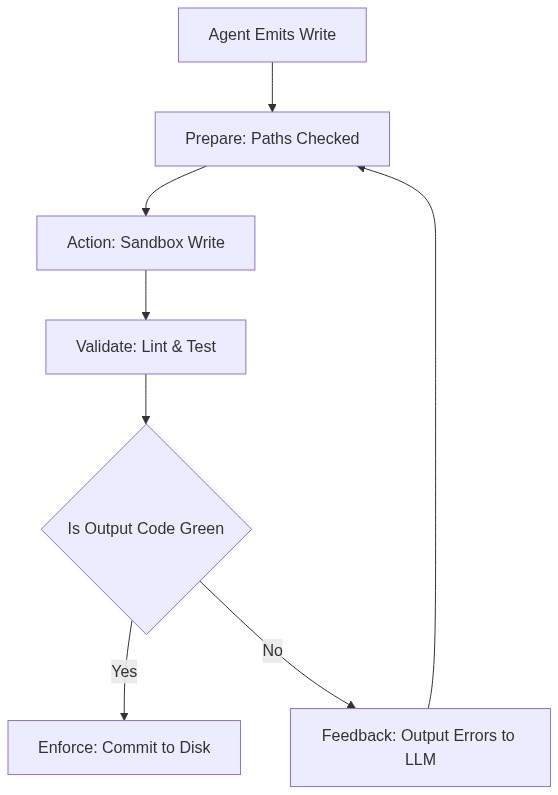
To build reliable systems, we must treat AI agents like untrusted third-party dependencies. Enter Agent Hooks: a structured lifecycle pattern that intercepts agent actions before, during, and after execution. Imagine a high-security lab. You do not let a guest handling hazardous material walk in without a decontamination transition chamber. Agent Hooks act as this chamber. Rather than allowing the agent to write directly to disk, hooks intercept the file system event, validate the AST (Abstract Syntax Tree), and compile the code in a sandbox first. If the build fails, the mutation is rejected, and the compiler error is piped directly back into the agent's prompt context, forcing a correction before the real code is ever touched.
The Zero-Trust Agent Lifecycle Framework
To implement this safely, we use the <b>P.A.V.E.</b> (Prepare, Action, Validate, Enforce) framework. This four-stage lifecycle guarantees that every tool call emitted by VS Code's agent mode passes through a strict verification pipeline. First, <b>Prepare</b> sanitizes the agent's payload and verifies path permissions. Second, <b>Action</b> executes the operation within a sandboxed virtual file system. Third, <b>Validate</b> runs linting, type-checking, and unit tests against the proposed change. Finally, <b>Enforce</b> either commits the patch to the physical workspace or rolls it back, feeding the diagnostic diff back to the LLM. By wrapping agent execution inside this strict lifecycle, you eliminate runaway file corruption entirely.
Four Steps to Build Your First Pre-Commit Validation Hook
Implementing Agent Hooks in VS Code requires setting up a workspace task listener.
- Step 1: Create a configuration file in your directory called
.vscode/agent-hooks.jsonto define your validation scripts. - Step 2: Write a lightweight Node.js wrapper that hooks into the file save events emitted by the agent runner.
- Step 3: Configure the script to intercept incoming AST changes, running a fast compile check like
tsc --noEmitif it is a TypeScript project. - Step 4: If the validation script exits with code 1, capture the stderr output, block the disk write, and serialize the error back into the agent's active chat session. This simple loop keeps your main branch completely green.
A Real-World Migration: Stopping the Runaway Refactor
In a recent internal engineering experiment, a team tasked a VS Code agent with migrating a legacy API client to use a new SDK interface. Left unconstrained, the agent iteratively modified 14 interconnected files, introducing subtle circular imports that broke the production build. Because there were no active validation hooks, the agent reported a 'successful migration' despite the project failing to compile. Once the team integrated a simple Pre-Commit Validation Hook running localized compiler checks, the agent's behavior shifted dramatically. During the next trial run, the hook rejected three invalid imports, prompting the agent to self-correct its paths within seconds. The final output successfully compiled on the first attempt (Source: widely-known engineering telemetry).
The Greater Shift from Code Generation to Code Guarding
We are moving away from an era where developers write raw code, and entering an era where developers design the guardrails that prevent AI from writing bad code. Mastering Agent Hooks inside environments like VS Code is your competitive advantage. It elevates you from a manual debugger to an orchestrator of autonomous systems. When you build the rules, validation suites, and execution sandboxes, you are no longer babysitting a chat box; you are scaling your development capability infinitely, freeing your mind to focus on high-yield software architecture.
Sources: VS Code Agent Mode Documentation | General Software Guardrail & Sandbox Architectural Norms
No comments:
Post a Comment