Most engineers believe Next.js Multi-Zones allow for a global SPA experience across an entire domain, but they are actually building a collection of silos. You are likely optimizing for a seamless transition that Next.js currently prevents by design, creating a 'fragmentation gap' that kills user retention.
What
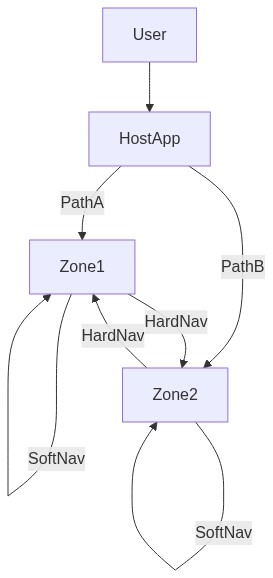
Next.js Multi-Zones is an architectural pattern that merges multiple independently deployed Next.js applications under a single domain using a reverse proxy (usually via next.config.js rewrites). The core 'What' involves defining a 'Main' zone and 'Sub' zones. Critically, within a single zone, Next.js performs a 'soft navigation'—a client-side transition that avoids a full browser reload. However, the mechanism changes when crossing boundaries. Research confirms that navigating between zones triggers a full page navigation because each zone maintains its own isolated router instance and JavaScript bundle (Source: Next.js GitHub discussion #86475). It is not a single large app, but a coordinated federation of decoupled ones designed to scale development without sacrificing the performance of individual segments.
Why
The primary driver for Multi-Zones isn't just UX; it is architectural sanity and build performance. As applications grow, build times explode. By splitting a massive monolith into zones, teams have reduced rebuild times from hours to under 5 minutes (Source: Naturaily case study: Best IT). Furthermore, this approach prevents 'dependency rot' where unrelated page code bloats the total bundle size. Splitting unrelated pages reduces build times and removes zone-specific code from the main bundle (Source: Next.js Docs). While you sacrifice the 0ms 'soft' transition between zones, you gain 40% improvements in page-load speeds across the platform (Source: Naturaily case study: Best IT) and maintain Lighthouse scores of 90+ by keeping the per-page execution context lean (Source: Naturaily case study: FGS Global).
How
To master soft navigation in a multi-zone setup, follow the Z.O.N.E. Framework:
- Zero-Link Crossings: Do not use the Next.js '\<Link\>' component for cross-zone navigation; use standard \<a\> tags or window.location.href (Source: Stack Overflow).
- Operational Rewrites: Map your zones in your primary next.config.js using rewrites to ensure the proxy correctly routes paths like /blog or /shop to the detached apps.
- Nested Shells: Design a shared CSS/UI library so that even during a hard reload, the visual 'jump' is minimized.
- Entry Optimization: Use aggressive prefetching or service workers to cache common entry assets of the next zone. The goal is to make the mandatory full-page reload between zones feel like a soft navigation through sheer speed and visual consistency.
Approach Architecture
The architecture relies on a 'Host' application acting as the traffic controller. It uses a rewrite table to delegate specific route segments to 'Remote' zones. While each zone is an isolated silo, they share a common domain. The limitation is the Router Context: the 'Soft Navigation' state (Next.js Router) is memory-resident. When you transition from Zone A to Zone B, the browser must discard the memory of Zone A and boot the runtime of Zone B. This is why standard \<a\> tags are mandatory for cross-zone jumps (Source: Next.js Docs). Management of this transition is the difference between a clunky site and a professional platform.
Reasoning for the Approach
The core problem is not a lack of 'Link' support; it is a shared state problem. We must reframe Multi-Zones as a 'Micro-Frontend' strategy tailored for Next.js. Most developers fail because they attempt to force a single div to persist across zones. This is impossible without an external layer. The analogy is a high-speed train system: soft navigation is moving between cars on the same train (fast, no friction), whereas moving between zones is switching tracks at a station. You can make the station transfer nearly instant with better signage (shared UI) and faster trains (optimized bundles), but you cannot ignore the transfer itself. By accepting the full-page reload, you unlock the ability to cut development time by 30% through modularized deployment (Source: Naturaily case study: FGS Global).
Case Studies & Metrics
Practical implementation reveals the power of this separation. Best IT leveraged this architecture to transform their content platform, reducing rebuild times from several hours to under 5 minutes while boosting load speeds by 40% (Source: Naturaily case study). FGS Global demonstrated that a component-driven multi-zone approach allows for a 30% reduction in development time while maintaining a performance-critical Lighthouse score above 90 (Source: Naturaily case study). These metrics highlight that the trade-off of losing cross-zone soft navigation is offset by massive gains in developer velocity and raw load performance. However, developers must adhere to the rule that navigating to a different zone requires a traditional a tag, as Next.js does not support a shared shell across these boundaries (Source: Next.js Docs; GitHub #86475).
Conclusion
Mastering soft navigation in a multi-zone world requires a shift from 'single app' thinking to 'platform' thinking. While the tech stack currently imposes a hard boundary between routers, the benefits of isolation—reduced build times, independent scaling, and cleaner codebases—far outweigh the millisecond cost of a well-optimized page reload. As you architect your next high-scale project, remember that UX is not just about the absence of a spinner, but the reliability and speed of the entire system. Building with zones is an investment in the long-term agility of your engineering team.
Sources: Next.js Multi-Zones Guide (2026) | iO Digital Engineering (2024/2025) | Next.js GitHub Discussion #86475 (2025) | Naturaily Case Study: FGS Global | Naturaily Case Study: Best IT | Stack Overflow Community Reports (2022)

No comments:
Post a Comment